
Professionals today face an unprecedented writing workload. Emails, reports, proposals, Slack messages, client updates, and presentations fill every workday. A 2025 LinkedIn survey revealed that 78% of knowledge workers spend at least 3 hours daily on written communication, up 25% from 2020. The expectation? Not just volume, but speed and perfection every time.
This constant demand creates writing fatigue—mental exhaustion from editing, rephrasing, and second-guessing tone. Burnout rates among writers and communicators hit 42% last year, according to Gallup. Remote work and global teams amplify the challenge, with non-native English speakers facing extra pressure to sound fluent and professional.
Enter Grammarly for Professionals: an AI-powered writing assistant that doesn’t just correct grammar—it transforms how you communicate, boosting confidence while preserving your authentic voice.
Why “Write Faster” Falls Short: The AI Writing Gap
Many turn to generic AI tools for speed, but the results often disappoint:
- Robotic tone: Messages sound like algorithms, not humans.
- Lost clarity: Important points get buried in awkward phrasing.
- Inconsistent voice: Brand personality vanishes across emails and docs.
- Time sinks: Heavy editing negates speed gains.
Grammarly for Professionals bridges this gap by focusing on enhancement, not replacement. It integrates real-time suggestions for grammar, clarity, tone, and conciseness directly into your workflow—email, docs, browsers, and collaboration tools like Slack, Teams, and Google Workspace.
Core Features That Set Grammarly Apart for Professionals
1. Real-Time Clarity and Confidence Boosters
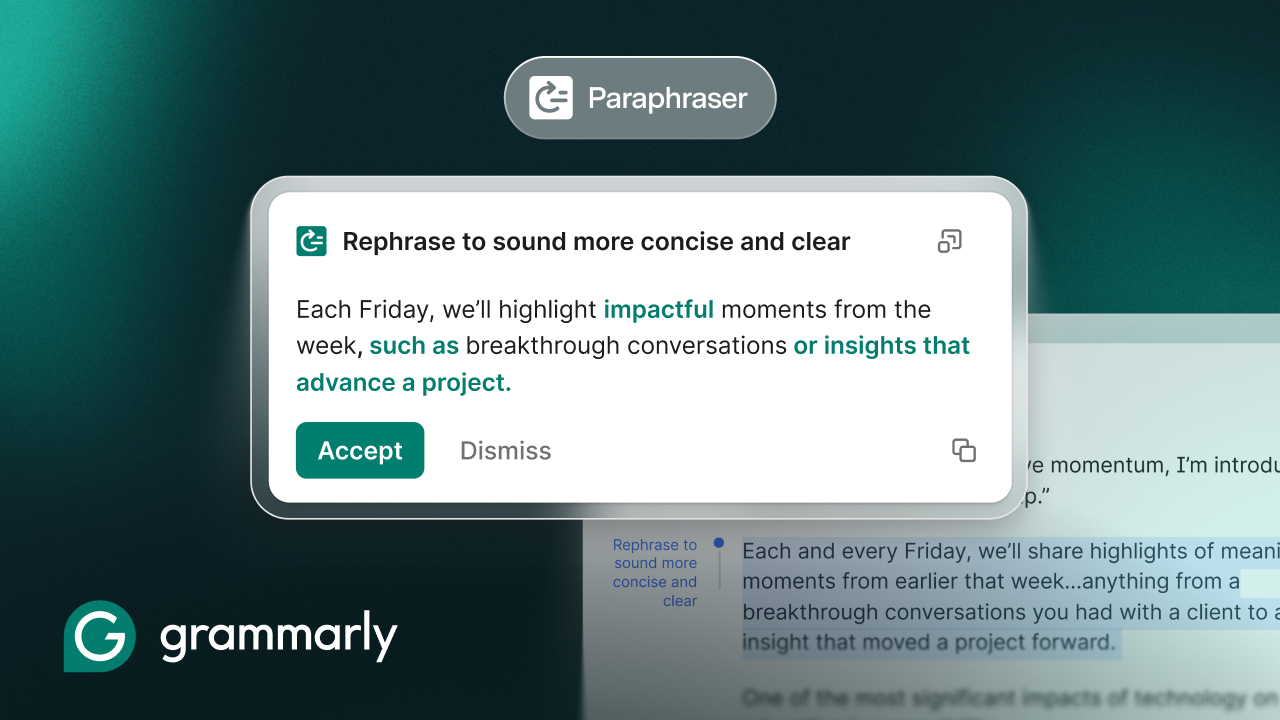
Grammarly scans your writing instantly, flagging issues like vague phrasing, run-on sentences, or passive voice. For example:
- Original: “The meeting that we had yesterday discussed the project timeline extensively.”
- Grammarly suggestion: “Yesterday’s meeting covered the project timeline in detail.”
This isn’t rote correction—it’s contextual improvement that makes your ideas shine.
2. Tone Detection and Adjustment
Tone matters in professional communication. Grammarly analyzes and suggests adjustments:
- Too formal for internal Slack? It softens the language.
- Client email too casual? It adds polish without stiffness.
- Sales pitch lacking confidence? It strengthens assertive phrasing.
Over 90% of users report improved tone accuracy, per Grammarly’s 2025 data.
3. Voice Preservation with Goal-Oriented Writing
Set your writing goal (e.g., “persuasive,” “professional,” “concise”) and audience (e.g., “manager,” “client”). Grammarly adapts suggestions to match, ensuring your personality stays intact. It’s like having a senior editor who knows your style.
4. Seamless Workflow Integration
No app-switching required:
- Email: Gmail, Outlook, Apple Mail.
- Docs: Google Docs, Microsoft Word, Notion.
- Chats: Slack, Microsoft Teams, Zoom chat.
- Browsers: Chrome, Edge, Safari extensions.
Mobile apps ensure on-the-go polishing, perfect for remote professionals.
5. Advanced AI for 2026: Beyond Basic Grammar
Grammarly’s 2026 updates include:
- Plagiarism detection for reports and proposals.
- Generative AI rewrites that maintain your intent.
- Engagement scoring to predict reader impact.
- Multilingual support for global teams (50+ languages).
Who Benefits Most from Grammarly for Professionals?
This tool shines for high-volume writers:
Managers and Executives
Draft board updates, performance reviews, and strategy docs with executive polish. Save 30-45 minutes per document.
Sales and Marketing Teams
Craft persuasive emails, pitches, and social copy that convert. Tone matching ensures brand consistency.
Remote and Hybrid Workers
Overcome isolation with clear, confident communication across time zones.
Freelancers and Consultants
Impress clients with error-free proposals and deliverables—build trust instantly.
Non-Native English Speakers
65% of Grammarly’s professional users are non-native speakers. It levels the playing field, reducing anxiety by 40% (internal study).
Case Study: Sarah, a Dubai-based marketing consultant, cut her email editing time from 20 minutes to 4 per message. “Grammarly caught cultural tone nuances I missed, helping me close deals faster.”
Proven Benefits: Data-Driven Impact
Grammarly’s enterprise analytics show tangible ROI:
| Benefit | Impact | Grammarly Metric |
| Time Savings | 2-4 hours/week | 62% faster editing |
| Error Reduction | 89% fewer mistakes | Real-time corrections |
| Confidence Boost | 76% user-reported | Tone and clarity scores |
| Burnout Reduction | 35% less fatigue | Shorter writing sessions |
| Communication Quality | 82% improvement | Engagement predictions |
Pro Tip: Track your “Writing Score” in the Grammarly dashboard—aim for 90+ to see productivity soar.
Grammarly vs. Competitors: Why It Wins in 2026
| Feature | Grammarly | ChatGPT | Microsoft Editor | Google Docs AI |
| Voice Preservation | Excellent | Poor | Good | Fair |
| Workflow Integration | 50+ apps | Web-only | Microsoft ecosystem | Google only |
| Tone Analysis | Advanced | Basic | Limited | Emerging |
| Professional Focus | Enterprise-grade | General | Office-focused | Basic |
| Mobile Support | Full | Limited | Good | Good |
Grammarly’s edge? It’s built for professionals, not casual users.
Getting Started: Practical Tips for Maximum Value
- Install Everywhere: Add extensions to all browsers and apps.
- Set Goals Daily: Customize for “email” vs. “report” modes.
- Use Rewrites Sparingly: Accept suggestions that fit your voice.
- Review Analytics: Weekly insights show improvement trends.
- Team Plans: For businesses, admin dashboards track team-wide gains.
Pricing starts free, with Premium ($12/month) unlocking full AI features. Enterprise plans add security and analytics.
The 2026 Outlook: Grammarly as a Productivity Essential
As AI evolves, writing tools like Grammarly will define workplace success. Gartner predicts 85% of enterprises will adopt AI writing assistants by 2027. In regions like the USA, UK, AU, UAE, Saudi Arabia, and India—hubs for global business—tools that bridge language gaps and boost efficiency are game-changers.
Grammarly for Professionals isn’t optional; it’s essential. It frees mental energy for strategy, creativity, and relationships, turning writing from a chore into a strength.
Ready to write better? Start with Grammarly today and experience the difference in your next email, report, or message.