
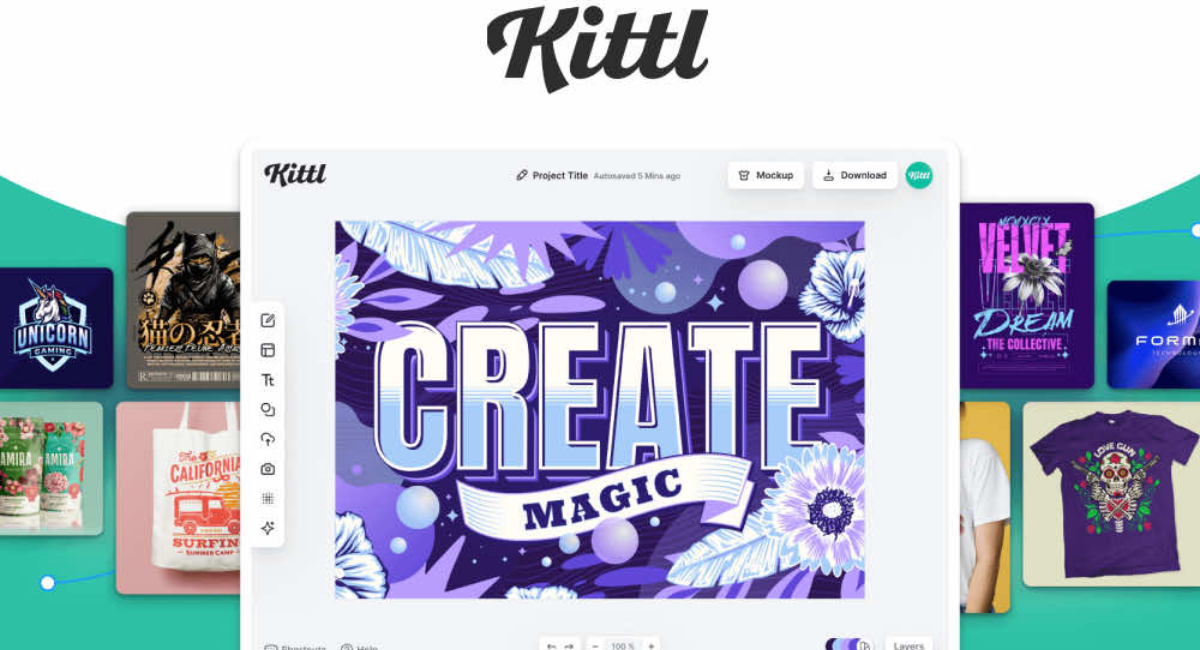
In today’s digital world, visual content plays a crucial role in branding, marketing, and online success. Whether you are a small business owner, content creator, freelancer, or print-on-demand seller, attractive designs can significantly improve engagement and sales. However, not everyone has advanced graphic design skills or the budget to hire professional designers. This is where Kittl comes in.
Kittl is a modern, browser-based graphic design platform that helps users create professional-quality designs easily. It focuses especially on typography-based designs, branding assets, merchandise graphics, logos, posters, and social media visuals. With an intuitive interface and powerful built-in tools, Kittl allows beginners and professionals alike to create stunning designs in minutes.
What Is Kittl?
Kittl is an online graphic design software that enables users to create visually appealing designs without needing advanced design knowledge. Unlike traditional design tools that require installation and complex learning, Kittl works entirely in your web browser.
It is particularly popular for:
-
Logo design
-
T-shirt and merchandise design
-
Typography-based artwork
-
Posters and flyers
-
Branding materials
-
Social media creatives
Kittl combines ready-made templates, drag-and-drop tools, advanced text effects, and a massive library of fonts and illustrations to simplify the design process.
Why Kittl Is Gaining Popularity
The popularity of Kittl is growing rapidly due to its ease of use and professional output. Many creators are shifting from complicated design software to Kittl because it saves time while maintaining high design quality.
Key reasons for its popularity include:
-
Beginner-friendly interface
-
Strong focus on typography
-
High-quality templates
-
Cloud-based access
-
Perfect for print and digital designs
Key Features of Kittl
1. Professional Design Templates
Kittl offers a wide range of professionally designed templates that users can customize easily. These templates are suitable for various industries and purposes, including business branding, apparel design, posters, and social media content.
You can edit text, colors, fonts, and graphics without starting from scratch.
2. Advanced Typography Tools
Typography is one of Kittl’s strongest features. It allows users to create eye-catching text designs using:
-
Curved text
-
Text outlines
-
Shadows and highlights
-
Letter spacing and alignment controls
This makes Kittl especially useful for logo creators, merch designers, and branding experts.
3. Large Font and Illustration Library
Kittl provides access to a rich collection of fonts and illustrations. These assets are carefully curated and suitable for both digital and print use.
Users can:
-
Browse premium-style fonts
-
Use decorative and vintage text styles
-
Add vector illustrations and shapes
This eliminates the need to download assets from multiple websites.
4. Drag-and-Drop Editor
The drag-and-drop editor makes Kittl extremely user-friendly. You can move, resize, rotate, and layer elements easily. Even someone with no design experience can create professional designs within a short time.
5. Cloud-Based Platform
Since Kittl is cloud-based:
-
No software installation is required
-
Designs are saved automatically
-
You can access your work from any device
This feature is ideal for freelancers and teams who work remotely.
6. High-Quality Export Options
Kittl supports high-resolution exports suitable for both print and digital use. Users can export designs in multiple formats depending on their needs.
This is especially helpful for:
-
Print-on-demand businesses
-
Logo printing
-
Posters and banners
-
Online marketing visuals
How Kittl Works: Step-by-Step Guide
Step 1: Create an Account
To start using Kittl, you need to create an account using your email or social login. The sign-up process is quick and simple.
Step 2: Choose a Template or Blank Canvas
Once logged in, you can either:
-
Select a ready-made template
-
Start from a blank canvas
Templates are recommended for beginners, while experienced users may prefer full creative control.
Step 3: Customize Your Design
You can customize every element, including:
-
Text content
-
Font style and size
-
Colors and gradients
-
Icons and illustrations
All changes are visible in real time.
Step 4: Preview and Adjust
Kittl allows you to preview your design before exporting. You can make final adjustments to ensure everything looks perfect.
Step 5: Export Your Design
Finally, export your design in the desired format and resolution. Your design is now ready for use.
Kittl Pricing Plans
Kittl offers both free and paid plans, making it accessible to a wide range of users.
Free Plan
-
Limited templates and assets
-
Basic design tools
-
Suitable for beginners and testing
Paid Plans
-
Access to premium templates and fonts
-
Advanced export options
-
Commercial usage rights
-
Priority support
Paid plans are ideal for professionals, businesses, and serious content creators.
Who Should Use Kittl?
Kittl is suitable for a wide range of users, including:
Small Business Owners
Create logos, posters, and marketing materials without hiring designers.
Freelancers
Design professional assets quickly and deliver projects faster.
Print-on-Demand Sellers
Create t-shirt, mug, and merchandise designs easily.
Content Creators
Design eye-catching social media posts and thumbnails.
Beginners
Learn design basics without technical complexity.
Kittl vs Other Design Tools
Kittl is often compared with tools like Canva, Photoshop, and Illustrator. While each tool has its strengths, Kittl stands out for typography-focused designs and simplicity.
-
Easier than Photoshop
-
More typography-focused than Canva
-
No installation required
-
Faster design workflow
Advantages of Using Kittl
-
User-friendly interface
-
Professional design output
-
Saves time and effort
-
No advanced skills required
-
Ideal for branding and merch design
Limitations of Kittl
While Kittl is powerful, it does have some limitations:
-
Requires internet connection
-
Some features are locked behind paid plans
-
Not as advanced as full professional design software
However, for most users, these limitations are minor compared to its benefits.
Tips to Get the Best Results with Kittl
-
Use templates as a starting point
-
Experiment with typography effects
-
Keep designs simple and clean
-
Use high-resolution exports for print
-
Maintain consistent branding colors
Is Kittl Worth It?
If you are looking for a fast, easy, and professional design solution, Kittl is definitely worth considering. It bridges the gap between beginner-friendly tools and professional-grade design software.
For entrepreneurs, freelancers, and creators, Kittl can significantly reduce design costs while maintaining high visual quality.
Future of Kittl
Kittl continues to evolve with regular updates, new templates, fonts, and features. As demand for quick and professional design solutions grows, Kittl is expected to become even more popular in the creative industry.
Conclusion
Kittl is a powerful yet simple graphic design platform that empowers anyone to create professional designs without complex tools or skills. With its focus on typography, branding, and ease of use, it is an excellent choice for businesses, freelancers, and creators.
Whether you want to design logos, merchandise, posters, or social media content, Kittl provides everything you need in one place. If you are searching for a modern design tool that delivers quality and convenience, Kittl is a smart choice.