
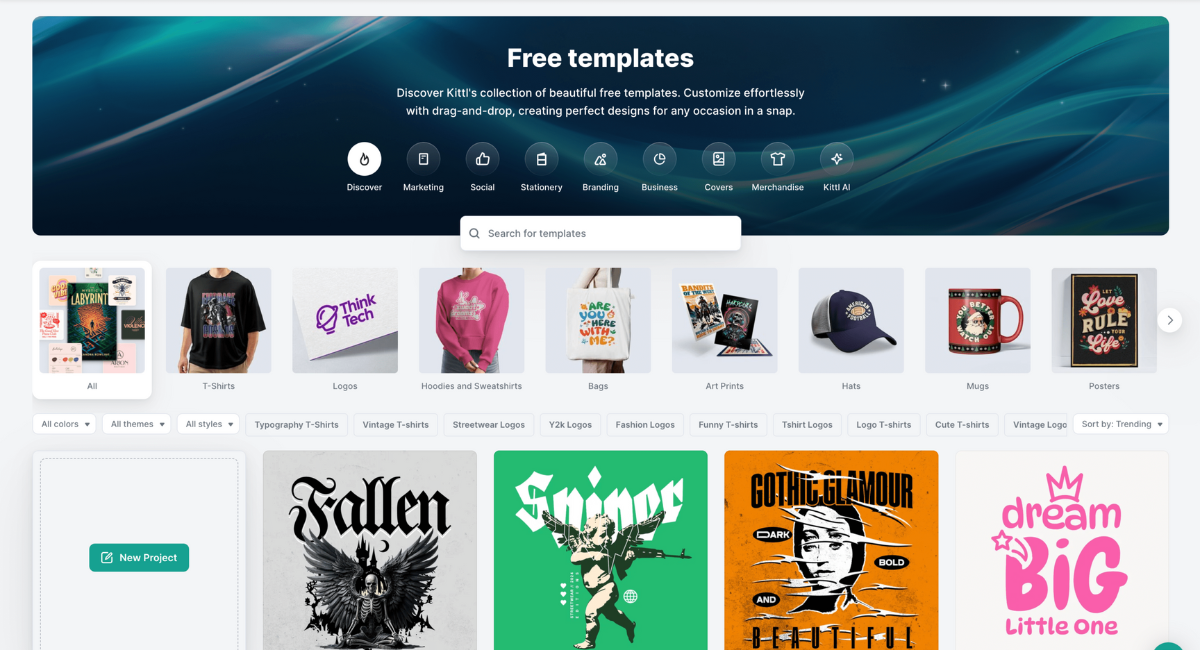
Graphic design has become an essential skill in today’s digital and business world. From startups and small businesses to freelancers and online sellers, everyone needs attractive visuals to stand out. However, professional design software is often complex, expensive, and time-consuming to learn. This is where the Kittl Design Tool comes in.
Kittl is a modern, browser-based graphic design platform that allows users to create professional-quality logos, t-shirts, typography designs, branding materials, and print-ready graphics without needing advanced design skills. Its clean interface and powerful tools make it ideal for both beginners and experienced designers.
In this detailed blog, you will learn everything about Kittl Design Tool, including its features, benefits, pricing, use cases, step-by-step working process, pros and cons, and who should use it in 2026.
What Is Kittl Design Tool?
Kittl Design Tool is an online graphic design software specially built for branding, typography, illustration, and merchandise design. It runs entirely in your web browser, meaning there is no need to install any software.
Kittl focuses heavily on vector-based designs, making it perfect for printing, scaling, and professional branding. Whether you want to design a logo for a company, a t-shirt for print-on-demand, or marketing materials for social media, Kittl provides everything in one place.
Why Kittl Is Gaining Popularity Worldwide
Kittl has gained massive popularity because it fills the gap between beginner tools and professional software.
Reasons for its popularity include:
-
Easy to use for beginners
-
Advanced typography and text effects
-
High-quality templates made by designers
-
Print-ready vector exports
-
Affordable pricing compared to traditional design software
Many creators now prefer Kittl over complex tools because it saves time while delivering premium results.
Key Features of Kittl Design Tool
1. Professionally Designed Templates
Kittl offers thousands of ready-to-use templates for various purposes such as:
-
Logo design
-
T-shirt and apparel design
-
Stickers and labels
-
Posters and flyers
-
Social media graphics
-
Brand identity designs
Each template can be fully customized with colors, fonts, shapes, and text.
2. Advanced Typography & Text Effects
Typography is the strongest feature of the Kittl Design Tool.
You can easily:
-
Curve text
-
Warp text into custom shapes
-
Add shadows, outlines, and strokes
-
Adjust spacing and alignment
-
Create vintage and modern text styles
These features are perfect for logos, merch designs, and branding projects.
3. Vector-Based Editing
All designs in Kittl are vector-based, which means:
-
No loss of quality
-
Perfect for printing
-
Easy scaling for large banners or small labels
This makes Kittl ideal for print-on-demand sellers and professional designers.
4. Illustration & Asset Library
Kittl provides a rich library of:
-
Icons
-
Hand-drawn illustrations
-
Decorative shapes
-
Frames, badges, and symbols
You can mix these assets with text and colors to create unique designs.
5. AI-Powered Tools
Kittl also includes AI features that help users:
-
Generate design ideas
-
Speed up creative workflow
-
Experiment with different styles quickly
These tools make designing faster and more creative.
How to Use Kittl Design Tool
Step 1: Create an Account
Visit the official Kittl website and sign up using your email or Google account.
Step 2: Choose a Template or Start from Scratch
Select a ready-made template or start with a blank canvas.
Step 3: Customize Your Design
Edit text, change fonts, add shapes, illustrations, and adjust colors.
Step 4: Use Typography Effects
Apply text warp, curves, outlines, and effects to make designs attractive.
Step 5: Preview and Export
Once satisfied, export your design in high-quality formats like SVG, PNG, or PDF.
Kittl Pricing Plans
Kittl offers both free and paid plans.
Free Plan
-
Limited templates
-
Basic export options
-
Suitable for beginners
Pro Plan
-
Access to all templates
-
Premium fonts and assets
-
Unlimited exports
-
Commercial usage rights
The paid plan is affordable and provides excellent value for money.
Who Should Use Kittl Design Tool?
Kittl is ideal for:
-
Small business owners
-
Print-on-demand sellers
-
Logo designers
-
Freelancers
-
Social media creators
-
Marketing agencies
If you want professional designs without complex software, Kittl is perfect.
Advantages of Kittl Design Tool
-
Beginner-friendly interface
-
Professional typography tools
-
High-quality vector designs
-
Time-saving templates
-
No software installation required
-
Affordable pricing
Disadvantages of Kittl Design Tool
-
Internet connection required
-
Limited offline access
-
Some features locked behind paid plan
Despite these minor limitations, Kittl remains an excellent design platform.
Kittl vs Other Design Tools
Compared to other tools:
-
Better typography than Canva
-
Easier than Adobe Illustrator
-
More focused on branding and merch
Kittl balances simplicity and professional power.
Is Kittl Worth Using in 2026?
Yes, Kittl Design Tool is absolutely worth using in 2026. It offers powerful features, modern design tools, and an easy learning curve. Whether you are a beginner or a professional, Kittl helps you create stunning designs faster and smarter.
Conclusion
The Kittl Design Tool has emerged as one of the best online platforms for logo creation, t-shirt design, branding, and print graphics. With advanced typography, vector editing, AI tools, and professional templates, Kittl makes high-quality design accessible to everyone.
If you want to build a brand, sell merchandise, or improve your design workflow, Kittl is a smart and reliable choice.